
Replatform Without Torching Your Revenue
Let’s be clear about what an SEO migration actually is. It is the process of transferring search engine ranking, authority, and indexing signals from your old environment to your new one .

Author
Sean Edgington
Date
Category
Development

Introduction
I see it constantly. A major e-commerce brand launches a beautiful new Magento or Shopify site. The UX is sleek. The checkout is frictionless. The design team is popping champagne. But two weeks later, the panic sets in. Organic revenue falls off a cliff. The marketing director is scrambling for answers while the agency blames “Google’s algorithm.”
Here is the brutal truth: Most website migrations fail.
They fail not because of bad design, but because of poor Technical SEO execution. When you change your URL structure, CMS, or protocol without a forensic plan, you aren’t just launching a new site. You are effectively burning down your digital store location and forgetting to leave a forwarding address .
This isn’t about vanity metrics. It is about survival.
Why “Good Enough” Will Bankrupt You
Let’s be clear about what an SEO migration actually is. It is the process of transferring search engine ranking, authority, and indexing signals from your old environment to your new one .
Your current site has built up organic equity over years. You have rankings for specific keywords that your customers use to find you . When you change URLs or content structures, you reset what search engines know about your business .
If you ignore this, you don’t just lose “traffic.” You risk losing your search engine rankings, leads, and ultimately, revenue . I have seen businesses lose 40% of their top-line revenue overnight because a developer forgot to migrate schema markup or botched the 301 redirect map.
A proper migration guarantees that you maintain your visibility . The goal is to mitigate traffic losses entirely . Anything less is a failure of Digital Strategy.
A Migration Protocol for Data Integrity
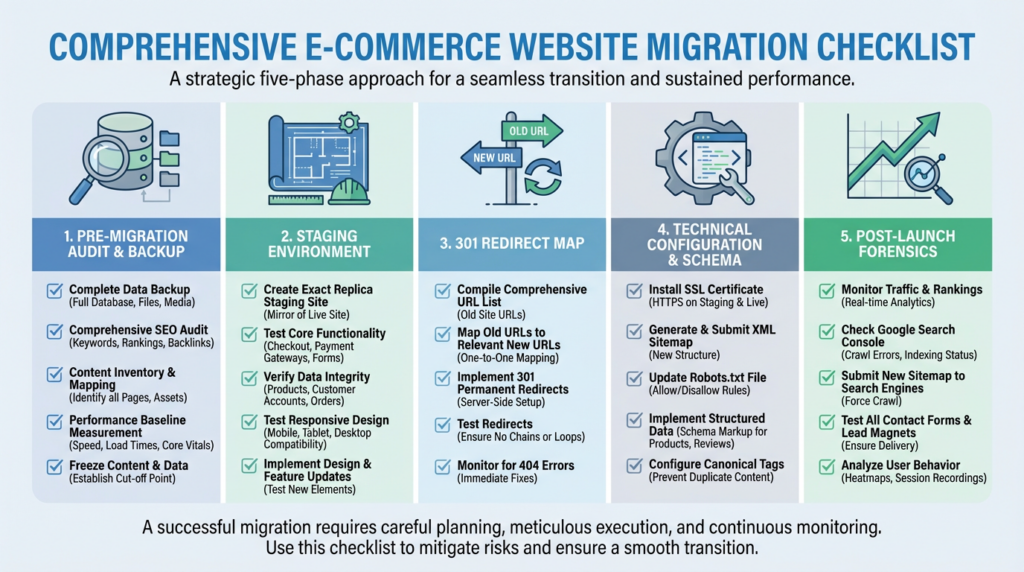
A successful migration requires a minimum of one to three months of preparation . If your agency says they can do it in two weeks, fire them. The complexity scales with your site size .
Here is the execution plan we use at Digital Mully to ensure E-commerce Growth survives the transition.
1. The Pre-Migration Audit and Backup
Before you touch a single line of code on the live environment, you need a safety net. Work with your development team to create a full backup of your existing site . You need a restore point if things go sideways.
Next, you need to crawl your current existence. We use tools like Screaming Frog to perform a deep-dive analysis of your current inventory . This crawl serves two purposes:
- It creates a baseline map for your redirects .
- It identifies “rot” in your current site such as broken links, missing meta tags, and duplicate content so you don’t migrate garbage to the new domain .
Critical Step: If you are moving to a completely new domain, check its history using the Wayback Machine . You need to ensure the new URL wasn’t used for spammy content in the past, or you will inherit a penalty before you even launch .
2. The Staging Environment
You never test in production. Your developers must create a staging environment that mimics the new site .
This environment is where we break things safely. It allows us to test design changes and functionality without affecting the live customer experience . Crucially, this staging site must be set to noindex so search engines don’t confuse it with your live site and flag it for duplicate content .
3. The 301 Redirect Map (The Revenue Saver)
This is where ROI is won or lost. You must create a comprehensive map of 301 redirects .
If you change your URL structure (e.g., moving from /product?id=123 to /products/blue-widget), you must tell Google where the old page went. If you fail to do this, every backlink and authority signal pointing to the old URL dies.
- Prioritize High-Value URLs: We use proprietary software to identify which URLs drive the most traffic and revenue . These must work perfectly on day one .
- Update Internal Links: Do not rely on redirects for internal navigation. Once the new URLs are set, update your internal linking structure to point directly to the new destinations to maximize crawl efficiency .
- The 404 Fallback: You will miss something. It happens. Create a custom, engaging 404 page that helps users navigate back to the homepage or relevant categories rather than bouncing .
4. Technical Configuration and Schema
A new site is a chance to upgrade your architecture.
- Schema Markup: Even if you didn’t have it before, implement Schema (structured data) now . It helps capture rich snippets and improves click-through rates .
- Robots.txt: Update this file immediately to tell Google which parts of the new architecture to crawl and which to ignore .
- XML Sitemap: Generate a new sitemap containing only your new, canonical URLs and upload it to Google Search Console immediately upon launch . This forces Google to recognize the changes quickly .
- Mobile-First: Google indexes mobile-first . If your new site is responsive on desktop but breaks on mobile, you will not rank. Period.
5. Post-Launch Forensics
Hitting “Go Live” is not the end. It is the beginning of the audit phase.
- Crawl Immediately: Run Screaming Frog again to check for broken redirects (redirect chains), 404s, and missing canonical tags .
- Claim Your Accounts: Update your Google My Business and Bing Places URLs immediately . This is vital for local SEO verification .
- Backlink Reclamation: Use Google Search Console to find broken backlinks pointing to your site and reach out to those domains or fix the redirects .
The Digital Mully Philosophy: Beyond the Checklist

You might read standard agency advice that treats migration as a checkbox exercise. They will tell you to “pick a smart date” or “coordinate with the team” . That is project management, not strategy.
At Digital Mully, we believe in Data Integrity above all else. Most agencies skip the hard work of manual 301 mapping or analyzing log files because it is tedious. They rely on plugins or automated tools that miss edge cases.
We also believe in defensive SEO. We advise clients to keep control of their old domain indefinitely . If you let your old domain expire, a competitor or spammer can register it and inherit your years of hard-earned backlink equity . That is a security risk you cannot afford.
Furthermore, we don’t just “watch” analytics. We implement an SEO Intelligence Program . We set up alerts for traffic drops and crawl errors because the landscape of organic search changes overnight . You need a system of checks and balances that spots trends before they become revenue holes .
Conclusion
A website migration is high-risk surgery. When done correctly, it sets the stage for massive E-commerce Growth. When done cheaply, it is a fast track to irrelevance.
You have built too much value in your brand to let a platform switch destroy it. Invest upfront in a correct SEO migration rather than paying double to fix the damage later .
If you are planning a migration and want a partner who cares more about your data integrity than the launch party, we need to talk.
Ready to migrate without the migraine?